Introduction
In SAP production systems, abap performance problems are often not caused by complex business logic, but by inefficient database access patterns hidden inside seemingly simple ABAP code.
What works perfectly fine in development systems with small datasets can quickly become a serious bottleneck in production, where large data volumes, concurrent users, and system load expose every design weakness.
In this article, I will explain how poor database access patterns impact ABAP performance and share practical lessons learned from real production systems.
Database Access Is the Real Performance Driver
In many performance discussions, ABAP logic is blamed first. However, in real-world SAP systems, the biggest performance cost usually comes from database access.
Each database call involves:
- Network communication
- Database parsing and execution
- Data transfer back to the application server
Even simple SELECT statements can become extremely expensive when executed repeatedly or without proper filtering. Well-structured ABAP code cannot compensate for inefficient database access patterns.
In production systems, reducing the number of database roundtrips is often more important than optimizing ABAP syntax itself.
SELECT Inside Loops: The Silent Performance Killer
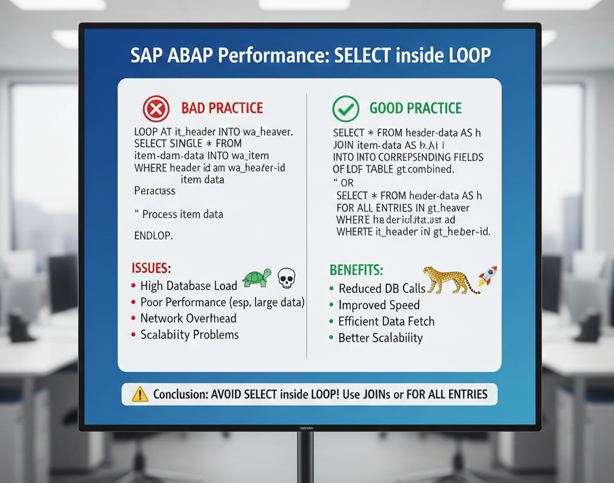
One of the most common and dangerous performance issues in ABAP is executing database SELECT statements inside loops.
This pattern often looks harmless:
- Loop over internal table
- Fetch related data with
SELECT SINGLE - Continue processing
In development systems with limited data, this code may run without any visible issue. In production, however, where loops can iterate thousands of times, this approach leads to massive performance degradation.
Each loop iteration triggers a new database call, resulting in hundreds or thousands of roundtrips. The performance impact grows exponentially as data volume increases.
In real production systems, this pattern is one of the most frequent root causes of sudden performance issues after go-live.
Ignoring Proper Index Usage
Even when developers use WHERE conditions correctly, performance problems can still occur if database indexes are not considered.
Common mistakes include:
- Filtering on non-indexed fields
- Using partial index fields in the wrong order
- Ignoring client or language fields in WHERE conditions
Without proper index usage, the database may perform full table scans, which become extremely expensive on large tables.
Understanding how SAP tables are indexed and aligning SELECT statements with those indexes is a critical skill for any ABAP developer working on performance-sensitive systems.
Fetching More Data Than Needed
Another common performance issue is fetching more data than the application actually needs.
Using SELECT * on wide tables increases:
- Network traffic
- Memory consumption
- Database processing time
While SELECT * is not always wrong, it becomes problematic when used in performance-critical areas or on tables with many fields.
A better approach is to select only the fields required for the specific business logic. This reduces data transfer and makes performance behavior more predictable under production load.
One Database Call vs Thousands
Production-grade ABAP development requires a set-based mindset rather than a row-by-row approach.
Instead of:
- Nested SELECT statements
- Repeated
SELECT SINGLEcalls
It is often far more efficient to:
- Use JOINs where appropriate
- Apply
FOR ALL ENTRIEScorrectly - Fetch all required data in a single database call
When used properly, these techniques dramatically reduce database roundtrips and improve overall system performance.
The difference between one optimized database call and thousands of small ones can be the difference between a stable system and a production outage.
Real Production Lessons Learned
Many ABAP performance issues only appear under real production conditions:
- Large datasets
- High user concurrency
- Background jobs running in parallel
Code that looks clean and readable can still fail if database access patterns are not carefully designed.
Over the years, I have seen performance problems that were not caused by missing hardware or system sizing, but by small design decisions made early in development.
Conclusion
ABAP performance problems rarely come from a single line of code. They are usually the result of design decisions that ignore how database access behaves under real production load.
Understanding and optimizing database access patterns is one of the most important skills for any ABAP developer working on large-scale SAP systems.
If you want to build scalable, reliable, and high-performing SAP applications, database-aware ABAP design is not optional — it is essential.
Related Article
You may also find this article useful:
SAP ABAP Performance Issues in Production Systems
For official SAP guidance on database access and performance best practices, refer to the SAP documentation available on the SAP Help Portal.